Examples of video content in emails

Following our introduction to video embedding, let’s look for some inspiration and examine how other businesses employ visually appealing video content to earn subscribers’ trust, improve product understanding, and increase engagement.

Onboarding videos

The first impression is the most crucial, and there is no second chance to make a good first impression. We recommend that you greet your new subscribers with a brief onboarding video rather than a generic text-based welcome email to avoid this situation. It’s an opportunity to make a personal connection with a potential customer right immediately and demonstrate the human face behind your company.

Educational videos

It is ideal if you want to explain something to your customers or show them how your tool or platform works. Adding video material to your email will do this. If you want to convey a new concept or display your tools at work, video is the best option because people don’t like reading boring text or seeing overly saturated infographics.

This is precisely what The Futur, an online design university, accomplishes with their video content. In order to promote their videos and stay in touch with their audience, they send out emails to their subscribers. Users can watch their most recent video and learn more about visual communication after clicking on the CTA button on the CTA button.

Video series

Tease and pique the attention of your viewers by releasing original video material in little chunks over a period of time. More often checking emails from your brand will become a habit for your customers. Additionally, it aids in the development of anticipation and the creation of long-term engagement. Integrate similar items or features into each episode, allowing your users to become more familiar with your product over time.

GIFs

To make your emails more humorous and down to earth, avoid using large movies and instead use animated GIFs to spice things up. Just make sure that the format you choose is consistent with the overall style and tone of your company. If you’re speaking to kids, millennials, or just a diverse, open-minded audience, animated GIFs are a terrific tool. They breathe life and animation into the text by incorporating animation into the paragraphs of text.

Announcement videos

It’s always preferable to convey news in person, whether it’s good or terrible. Video announcements help by strengthening the bond between your brand and your customers. Because there is something lovely in the faults of self-recorded movies, you can utilize your limited budget to your favor — announcements will appear even more trustworthy as a result of your efforts.

Promotional videos

Creating this form of video content is one of the foundations of the eCommerce industry. People want to know exactly what they are purchasing. And it is your responsibility to present your product in its best light.

Makeup retailer Sephora employs video material to educate their audience on the current makeup trends. They also encourage people to purchase and experiment with their new items with confidence.

Behind-the-scenes videos

There’s something beautiful about peering behind the curtain and witnessing people develop something you’re enthusiastic about. Give your customers the opportunity to be impressed by demonstrating how their favorite product is manufactured.

For digital products, show your users what goes on at your office and what members of your team are up to on social media. The underlying concept is the same: by putting your viewers in contact with your company, you will boost their emotional involvement and brand loyalty.

Testimonials

In lieu of generic, faceless evaluations, ask your customers to record brief testimonials. You’ll be astonished at how many individuals enjoy being acknowledged and are willing to assist others when asked. You can utilize these movies as short case studies and distribute them to your prospects.

Entertaining videos

Isn’t it true that not everything is about sales and products? Sometimes all your leads and customers want to do is relax, absorb the moment, and enjoy life to the fullest. Sending them amusing video emails that are tied to a specific occasion will help to support and spread the good vibes.

In Conclusion

You should be mindful of the fact that some of your subscribers may be visually or audibly impaired. In addition, some users may be experiencing problems with their internet connection or with a faulty pair of headphones. You don’t want to leave them feeling frustrated, so always provide them with an other solution. If you have a bilingual audience, make sure to include a description for each video. And make sure subtitles are available for each video.

Video email marketing is entertaining, and you don’t have to spend a lot of money to get started. Just make sure that the lighting is good enough and that the space is silent before beginning to record basic welcome videos or testimonials in your office setting.

How to do Email Marketing

A/B testing (also known as split testing)

Attempt to send out several different copies of an email! And then confirm which one is the most effective. A/B testing is available through services such as Mailchimp, Campaign Monitor, and Aweber. They allow you to test different combinations of content, header, call to action, and other elements.

  • Choose a small initial group of people to whom you will send different variations of your email; these people must be representative of the entire list.
  • Following that, select the various versions you’ll be testing and distribute them to the individuals who have been selected.
  • Following an evaluation of the results, the winning email will be selected and sent to the entire list of recipients.

Email Markup

By utilizing Email Markup, you can create richer emails that contain more information and have a different presentation.

Users can take action or view information through these direct interactions without having to open an email and search for the content that is relevant to them first.

For emails, your Jumpseller store is already set up to use the schema.org markup format, which is already integrated.

There is no need to configure this markup in order to have it appear in your business.

Frequency

Email marketing is a cost-effective and effective way to reach customers, but sending too many emails can be detrimental to your company’s image.

Make sure to determine the most effective frequency for sending out emails. Is it your intention to go once a week or once a month?

You must make a decision based on the information you wish to share, the product or service you are selling, and the requirements of the industry in which you operate.

The important thing is not to exhaust your content, become predictable, and ultimately lose your target audience.

Automated Emails

Newsletter and emails within a marketing campaign are important, but often talking about email marketing, people forget to mention transactional emails.

The emails that are sent after the customers have taken a certain action on a website, this action might not even have to be a purchase, it can be anything, for example, a simple form filling to create an account on the website.

Although these are automated emails, they can also be used for marketing, and indeed remarketing. Consider making them entertaining, aligning them with your company’s brand image, leaving a message for the visitor, and avoiding being boring.

The Option to Unsubscribe

The option to UNSUBSCRIBE should be available to the customer at all times.

It is possible that people register themselves by mistake, or that the email address that was registered is currently being used for something else.

Whatever the reason, it must be very apparent to the customer that they have the option to opt out! What is the significance of this?

The primary purpose is straightforward: to avoid being labeled as SPAM (unwanted commercial email).

The option to unsubscribe is usually located at the bottom of the email. Because it is required in some countries, most businesses automatically include this feature as a standard feature.

Analysis

The ability to track and measure results is a major reason why email marketing is so popular.

Following the completion of a successful email marketing campaign, such as sending out a monthly newsletter, it is always a good idea to conduct a post-campaign analysis.

The open rates, unique clicks, spam reports, and unsubscribe figures are all important metrics to track and analyze.

You should also keep track of which links were the most popular and which ones did not perform well. By doing so, you can gain insight into the behavior of your audience, determine what type of content they are interested in, and tailor your subsequent emails accordingly.

5 important lessons the pandemic taught email marketers

The 18 months that have passed since we began to use the terms “COVID-19” and “pandemic” in our marketing vocabulary have prompted marketers like me to reflect on how we should revise our email programs, what our customers are experiencing, and how much everything could change before we return to our previous version of “normal.”

We’ve now gone through the complete marketing calendar for the year. Before we start planning another one, it’s important to take a step back and reflect on what we’ve learned, modified, and changed — as well as what we need to keep in mind as we move forward into the next chapter.

Here are the five lessons we’re taking away from this experience:

  1. It is now more important than ever for us to empathize with our clients and consider how our marketing might better fulfill their demands.

We’ve long advocated for “helpful marketing,” which is a customer-centric approach to marketing that can be applied to both business and consumer markets. When you concentrate your marketing efforts on assisting clients in achieving their objectives, they will in turn assist you in achieving yours.

When the epidemic spread over the world, we all went through tremendous upheavals, which demonstrated how critical it is to lead with empathy, to think about what our customers are going through, and to put them first in our marketing efforts.

Customers will respond positively when we demonstrate our humanity while also acknowledging theirs. Even as we transition into a post-pandemic world, seeing our consumers as people first and purchases second can help us make better decisions about how we connect with them.

Is it effective? Yes! People are responding well to the transition in message from overtly promotional emails to include instructional content that we believe is important to them, according to marketers, including my Holistic team. We’re still in the business of selling, but we’re adjusting our techniques to better understand how, when, and what customers want to purchase.

  1. It is important to be adaptable.

Agile marketing had been established for a long time prior to the epidemic. However, the abrupt economic and cultural swings, reversals, and shutdowns that occurred throughout 2020 required many marketers to completely rethink everything from their marketing goals for the year to the mechanics of getting emails out the door on time.

When previously reliable but unremarkable sales of some products suddenly became hot sellers and prime targets for email campaigns, the products were reclassified as “hot sellers.” Other products were knocked off the top of the lists. Is it accurate to say that your marketing reflected the changing product dynamics?

Marketers who are successful nowadays are those who are able to shift gears fast, whether it’s swapping items in and out of a campaign or pulling one campaign and launching another.

And we haven’t even gotten out of the woods yet.

Everything you need to know about sending emails that your consumers will want to receive and that will not be blocked by their inboxes. Download MarTech’s Email Marketing Periodic Table for free.

Additionally, the pandemic’s novel varieties threaten public health in a number of different parts of the world, in addition to supply-chain concerns and quickly eroding consumer confidence. What we’ve learnt from agile marketing may be able to assist us in responding more effectively to these developments.

According to a recent Salesforce study, 84 percent of respondents said that customer expectations are changing their digital initiatives, and 34 percent said that they struggle to innovate marketing technology, tactics, and strategies. I believe that my fellow marketing executives are catching on to this.

In the end, the abrupt change to remote work in 2020 revealed flaws in the day to day operation of the email pipeline. When colleagues worked from their dining room tables instead of the office, they were balancing home life and family difficulties on top of their job obligations, which caused major problems for many email operations.

These issues range from the time it takes to deliver an email campaign to recipients’ inboxes to gaining access to the data we use to plan, design, and send campaigns, as well as to create or tune up automations.

Marketers that must wait days for access to sales or inventory data, as well as access to customers’ lists, will fall behind their competitors who have systems that place a high value on speed and flexibility.

  1. Automations are not

    something that can be set and forget.

However, in 2020-2021, we were continuously reminded of this lesson, which we applied throughout the year.

All of the technologies available to you for segmenting, personalizing, and automating your messaging is included into truly helpful marketing campaigns. One of the most effective ways to assist your consumers is to display to them relevant messages that are based on their personal information.

A regular email message does not express that level of personal awareness and awareness of the recipient.

Since a result, using automations in your message content can really assist you in sending more tailored emails, as they use data to select information that will personalize and enrich your messages, or they can choose a specific audience for the content you are sending. As a result, quick and easy access to data is critical for agile marketing in an environment where conditions might alter from week to week, or even day to day, depending on the situation.

When items or services become unavailable, you can update campaigns on the fly. You can also halt a campaign in one location and ramp it up in another, all without having to restart the campaign.

As a result, you should keep an eye on your automations at all times, including the ones that your consumers see in real time and the back-end automations that influence audience and content selection. There are a variety of challenges to consider, not simply pandemic-related ones.

When the world seems to be delivering one disruption after another – massive fires, floods, or hurricanes, political and social upheaval, economic disruptions – we must ensure that our automations are updated to reflect our new messaging, customer and business needs, and business goals, among other factors.

  1. Find out where you can geolocate yourself.

We also learned that we need to match our marketing to certain markets or places as closely as possible to ensure that our marketing is as effective as feasible. For example, instead of sending out generic messaging to everyone who might be offended, you should give targeted marketing that resonates with your target audience.

Marketing by zones or by country can assist you in tailoring your programs to the specific conditions that your customers are experiencing.

Consider the differences between the business experiences in the United Kingdom and the United States. The United Kingdom has been placed on near-total lockdown. Whereas in the United States, state governments governed business and school closing and opening hours rather than the federal government, the response throughout the 50 states differed from near-total lockdowns to minimal, if any, alterations in operations.

As a result, marketing communications that did not take into account geographical differences were likely to be ineffective or even harmful to client relationships.

Here’s another illustration: Consumer expenditure is beginning to be affected in the United States as a result of novel variations and a rise in infections. This occurred originally in the travel industry, which was only recently beginning to recover from the 2020 recession, but it has now spread to consumers’ willingness to shop in stores or return to malls as a result of the recession.

Consumer confidence has returned to pre-pandemic levels in the United Kingdom, where the delta variant has reached its zenith, according to a recent PwC survey.

Like agile marketing, these lessons apply not only to ongoing pandemic conditions but also to any events that have a disproportionate impact on different populations. However, in order to comprehend what is occurring and how to respond, you must keep up with the latest news and maintain contact with industry associations.

  1. Pay attention to

    what is going on.

We can easily keep our heads down and concentrate on the duties in front of us, especially when we have to constantly adjust and update our plans and programs to account for changing circumstances.

But, to paraphrase my colleague and MarTech contributor Ryan Phelan, “keep your eyes on current events, because we aren’t through yet.”

In your online meeting scheduler, set aside time each day to catch up on current events, no matter how painful it may be. Participate in trade organizations whose leadership reflects the diversity of the community or the worldwide nature of the organization. You may be well-versed in the conditions of your home country, but if you plan to market worldwide or across continents, this knowledge is crucial.

Learn about the issues that your consumers in these various regions are dealing with. It is a defining characteristic of helpful, customer-centric marketing. This first-hand understanding will assist you in remaining cognizant of the situations in which your words will be delivered in the future.

You might also utilize your first-hand knowledge to assist in company planning, to identify previously unidentified opportunities, or to prevent unintended mistakes from occurring.

Finally

It has been a regular laboratory for the past 18 months, where we have analyzed constantly fluctuating situations and experimented to determine the most effective response strategies. Throughout it all, however, one lesson stood out loud and clear: Putting customers first — and keeping their needs and goals at the forefront of your mind — will help you weather and adapt to the changes we’ve all experienced, and will position you to be better prepared for the challenges that lie ahead.
Email marketing software that can help manage your list

A critical component of successful email marketing campaigns is targeting the right people. To do this, you need to use proper list management strategies and segmentation tools. This combination ensures you are sending emails to those who want to receive your messages, while also making sure that those who want your emails are getting messages that appeal to them specifically. Here are four email marketing software providers that can help you with both strategies.

ConvertKit

ConvertKit is email marketing software you can use to create emails and build landing pages. The software is fairly intuitive to use, and it should integrate with your website, CRM, and accounting software.

It offers a wide variety of useful features, including an autoresponder, form-building capabilities, and the ability to tag subscribers. You can use ConvertKit to track the following analytics:

  • Total subscribers
  • New subscribers
  • Average open rate
  • Average click rate

ConvertKit is best for bloggers and businesses that sell digital products. The only real downside to the software is that its email and newsletter templates are pretty limited.

HubSpot

Hubspot is a leader in marketing software, and its email management solution is one of the best out there. You can use the software to create and track personalized email campaigns.

The email editor is incredibly comprehensive, with a wide range of templates for various purposes. You can add content blocks like images and buttons and edit the design.

One of HubSpot’s most useful aspects is that it lets you personalize emails based on where your customers are in the client life cycle. You create an email, and HubSpot will adjust details like the subject line to fit that customer.

It also gives you access to extensive analytics about your campaigns. You can track your open rate, unsubscribes and spam reports. HubSpot will show you which subscribers are the most engaged and which links get the most clicks.

The only real downside to HubSpot is the price; it isn’t the most affordable option for small businesses.

Constant Contact

With Constant Contact you can manage your email list, set up a website, and monitor your ad campaigns all in one location. The software is incredibly functional and offers many advanced email marketing features.

Constant Contact offers hundreds of email templates, with many editing options available. You can customize the fonts and brand colors for each email by entering your website URL.

You can also add contact blocks, videos and social sharing options. The software’s drag-and-drop tools make it easy to design each email exactly the way you want it.

If you switch to Constant Contact from another email service provider, you can automatically import your contacts. You can also use the software to grow your list, create signup forms and access advanced reports.

The software is relatively intuitive, so it’s a great option even if you don’t consider yourself particularly tech savvy. However, the company doesn’t provide 24/7 customer support, which could be a downside for some people.

Mailchimp

Mailchimp is one of the best options for anyone new to email marketing. The software is easy to use but provides plenty of advanced reports that let you take a data-driven approach to email marketing.

When you sign up, Mailchimp walks you step by step through the process of setting up your first email campaign. You can either choose an email template or build your own from scratch. Mailchimp will even spell-check your emails for you when you’re done.

One of the things that makes Mailchimp stand out is its advanced reporting features. The software gives you insights into the results of each email campaign, showing you which ones had the biggest impact on your bottom line.

Mailchimp’s functionality and ease of use make it an excellent option for beginners. However, its customer service options are limited on low-tier plans.

BIMI: What Is It and What Does It Mean for You?

Email marketing is a constantly evolving field. Email providers are constantly seeking for new ways to improve their user experience or add a layer of protection. And email marketers must constantly be willing to adapt.

When Google announced that they will enable BIMI, a new feature on the horizon that promises to improve user experience while also increasing security, marketers began to wonder if this was the next big thing.

What is the solution?

It’s time to study every new feature in the email marketing landscape. Let’s look at what BIMI is, how it works, and how you can use it to improve your email marketing approach.

What is BIMI?

Brand Indicators for Message Identification (BIMI) is an acronym for Brand Indicators for Message Identification. In a nutshell, BIMI displays your company’s logo next to marketing emails you send to your subscribers while they are in their inboxes.

BIMI has a couple of distinct functions. By putting the sender’s logo next to the emails, it first establishes brand familiarity. This establishes a strong visual connection.

Second, BIMI functions as a safety feature. Your logo next to your message confirms to your subscribers that this is, in fact, a message from you and not an imposter.

In an era when it’s more difficult than ever to stand out in an inbox, and phishing emails are on the rise, it’s easy to understand why this would be a very enticing feature to email marketers. You get better control over your subscribers’ experience, more brand recognition in the inbox, and more security over your brand reputation.

How do you implement BIMI?

To get BIMI to work with Gmail, you’ll need to meet the following criteria:

  • Set up DKIM authentication for your mail streams with your domain.
  • Create a DMARC record with a different policy than p=none.
  • Your logo is protected by copyright.
  • Get a VMC for that logo.
  • Make an SVG Tiny PS version of your company logo.
  • In your domain’s DNS, create a BIMI TXT entry.
  • Check to check if your setup is working properly.

After that, your logo can be shown alongside your emails in a Gmail inbox.

What does BIMI mean for you?

For marketers, the opportunity to give email validation and increased brand presence in the inbox is intriguing.

So, how can you know if it’s the correct fit?

  • Take a look at a breakdown of your subscribers’ email client usage to check if the BIMI-supporters you listed are well represented.
  • Examine each provider’s requirements to discover which ones you already have in place.
  • Consider how much time it would take to put up the remaining pieces. Note: If you need help getting started, consider BIMI-setup-assistance services.

Remember, because the requirements are currently per email provider, the implementation option does not have to be all or nothing.

If you’ve decided to get started, start by meeting Yahoo’s standards and testing with those users. If you’re getting good results, it might be time to invest in the setup needed to use BIMI for Gmail users as well.

Finally

Email security and validation have never been more important in the history of email, and BIMI offers a fantastic opportunity to supply both.

Whether you decide to go ahead with it or not, it’s crucial to keep in mind that new technology features perform best when they’re combined with good list management.

If BIMI appears to be a good fit for you and your company, then getting started is a no-brainer. If the required authentications and copyrights aren’t already in place, it can take a long time to obtain them. It may, however, be well worth it in exchange for a more secure and trusted user experience.

Demystifying Deliverability: How to Relaunch Your Email Marketing Post-Shutdown

While we appreciate the necessity for marketers to engage with their audiences, it’s equally critical to consider the impact these emails have not just on your sender reputation, but also on the experience of the individual who receives them.

Deliverability of your emails and maintaining your (and our) sender reputation are major priorities for us as your trusted email service provider! Before you send your next email, consider the following points.

Permission to send emails does not last indefinitely.

People forget where and how they signed up for your email list, so permission to send emails might soon expire. This is especially true if you haven’t contacted your subscribers by email in the last 12 months. People who last shopped, dined, or connected with you 1-5 years ago are unlikely to recall who you are, how you obtained their email address, or why they are suddenly receiving your emails.

Sending emails to an unengaged list with many inactive addresses will result in low open rates, high bounce and unsubscribe rates, and potentially high spam complaint rates in terms of engagement and delivery. Mailbox providers (Gmail, Yahoo, Microsoft, and B2B domains) use these metrics to assess your sender reputation and how to treat your emails.

Your emails will be delivered to the inbox if you have a good sender reputation, but if you have a bad sender reputation, your emails will be blocked or screened as spam.

Analyze and segment your database based on subscriber behavior.

We strongly advise analyzing your database and segmenting your list depending on user activity and engagement before sending your next campaign. This aids you in determining:

  • Subscribers who have opened an email or clicked a link in the last 12 months are the most engaged.
  • Your most recent subscribers who signed up for your emails during the previous year
  • Contacts with recent online activity, such as online purchases, website visits, account activity, and active paid subscriptions.
  • Your most inactive and unengaged subscribers from the previous 12 months who do not fulfill the aforementioned criterion

If you’ve been in touch with your list on a regular basis throughout the last year, you can keep sending emails to your engaged subscribers and consider sending a re-engagement email to your inactive or unengaged subscribers. If you haven’t emailed your list on a regular basis—at least 1 or 2 emails every 6 months—you’ll need to gradually increase the number of emails you send to your entire list.

Any subscriber who hasn’t emailed or engaged with you in over a year should be removed from your list, since sending to these “ghost” addresses will only hurt your sender reputation. You also run the danger of emailing spam traps and being blacklisted by anti-spam software.

Increasing the number of emails sent to your entire list

Your sending domain – everything following the “@” in your From email address — is linked to your sender reputation. You may need to gradually train mailbox providers that your emails are real and that your subscribers wish to receive them, depending on when you last emailed your entire list and the size of your list.

Send an email to a smaller portion of your list and track how your subscribers respond over the next 24 hours to re-establish your domain’s reputation. If you see good delivery and engagement data, such as open rates of more than 10%, bounce rates of less than 4%, and spam complaints of less than 0.2%, you can double the volume for your next campaign and check the results again after 24 hours.

Before ramping up to your entire list, it’s critical to examine your results after each campaign to see how the increase in email volume affects your overall performance and take actions to fix any underlying engagement issues.

After each campaign, have a look at the outcomes.

Your subscribers are the best source of information about the effectiveness of your emails. After each campaign, review your campaign analytics to evaluate how active and engaged your audience is, as well as any unfavorable indications, such as a decline in open rate or an increase in spam complaints bounces.

These analytics show any flaws with interaction and delivery, which have a direct impact on your sender reputation and future campaign success. Users of Campaign Monitor can track user interaction over time using the Insights portion of their account.

Email delivery and engagement issues are frequently symptoms of how emails are gathered and managed, and examining both might reveal the root cause of these problems. Are your mailing lists permission-based, meaning that users have opted in to receive your emails? With a reCAPTCHA, is your online form safe from spambot attacks? Do you have DKIM authentication set up for your sending domain? Are you re-engaging your less active contacts and eliminating dormant “ghost” contacts?

The easiest method to maximize user engagement and avoid deliverability concerns is to follow these recommended deliverability guidelines.

Finally

Your subscribers’ inboxes, like yours, may be flooded with emails from brands with whom they were previously associated right now. To engage your audience and make your emails stand out from the pack, think like a subscriber and offer relevant, needed material.

You can help your emails land in the inbox by focusing on your most active and engaged audience and creating and preserving your domain’s sender reputation.

To show respect for your subscriber’s inbox, develop brand loyalty, and a long engaging relationship, keep your emails personable, useful, brief, and relevant.

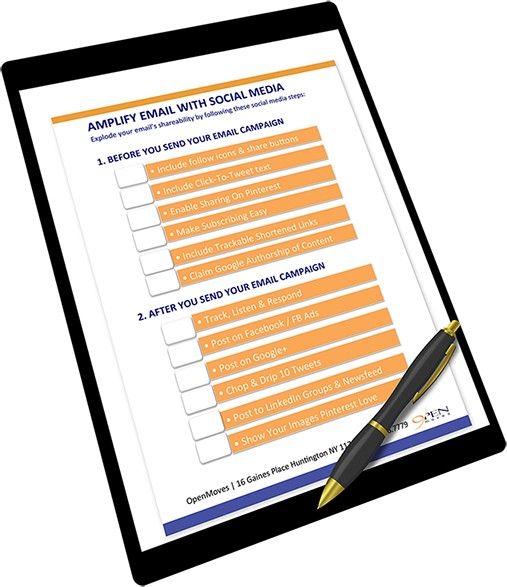
Email Campaign Preflight Checklist

The anxiety of sending an email, especially for marketers, is genuine. It might be difficult to strike a balance between high-quality content and a professional email structure. Unfortunately, even with seasoned people in the mix, email blunders can occur.

We’ve designed an email campaign preflight checklist that you can save, print, and use to reduce email errors (then repeat).

Before hitting “send,” our email team performs this checklist to ensure that our professional email format is perfect, typos are fixed, and a marketing strategy is in place. This email infographic can be used by your entire team for review as well as for dissecting your own communications.

With the email campaign preflight checklist, you can create an error-free, professional email format.

Instead of being afraid, send emails with confidence and wait for the results to come in.

Timing

Date and time of send: Select a date and time for your send and mark it in your calendar. Make sure it doesn’t conflict with any other sends, and if it does, suppress any lists that are affected.

The details

  • Check for typos and customization in the subject line.
  • Have you altered the preheader text? Make sure there are no mistakes.
  • Have you adjusted the footer, if necessary?
  • Always provide your company’s physical address as the sender address.
  • Reminder about permissions: have you modified them as needed?
  • You must always offer an unsubscribe link.
  • Are the social icons connected to the relevant social networks?
  • Are the images properly linked? Have you used ALT text to describe your image? Both procedures are necessary because they provide alternate ways to see the email in the event that it does not render properly.
  • Do you have a fallback color for background images?
  • Are your headlines well-connected?
  • Is the connectivity between the CTA buttons correct? They must be linked to the appropriate landing pages in order for your viewers to take the necessary step to convert.
  • Do you have a back-up plan for personalization?
  • Who should view dynamic content? Gender, locality, and other list specifics can be used to define this.

Lists

  • Do you have any lists that need to be suppressed?
  • Are there any parts of your list that you need to leave out?
  • Do you have all the fields you require in your subscriber list?

Testing

Have you sent yourself a test email in order to get an idea of what’s in your inbox? This is a crucial step in the preflight checklist since it will show you not only how the email opens, but also what changes you may need to make after viewing it on a computer or mobile device.

Have you run a full inbox test? What works well in one email client may not work well in another, so make sure you do a full inbox test to examine how your message appears in different email clients.

Is this advertising being A/B tested? This is critical for your email campaign to be successful. An A/B test allows you to send two different versions of the same email to small groups of your email list. Whichever one performs better should be sent to your entire mailing list.

Other

Notify appropriate teams, such as customer service or sales. Send them a link to the campaign, tell them who the target demographic is, and let them know when the campaign will go live.

Send

You can send your campaign right away or later. When you take the effort to do an A/B test before sending to everyone on your list, deciding on the best time becomes a lot easier.

Following that

View your campaign’s analytics to see how it fared. Analytics can show you who is reading your material, where they are coming from, and a lot more. These actionable insights aid in the improvement of a specific email campaign as well as your overall email marketing strategy.

Lastly

We all make mistakes, but we hope that this pre-flight email campaign checklist will help you send your emails with confidence.

How to Get People in the Habit of Reading Your Emails

Do you open certain marketing emails from firms on a regular basis, while ignoring others?

For the most part, the answer is affirmative. With average open rates hanging around 15-25 percent, this indicates that 75-85 percent of emails are categorized as “completely disregarded” in the minds of readers.

As a result, the essential question for marketers becomes, “How do you ensure that your advertisements are the type that people always open?”

We’ll provide you practical ideas on how to persuade people to open and read your emails in this post.

Maintain a regular schedule.

If your subscribers don’t know when to expect your emails, they won’t open them.

That’s why choosing (and sticking to) a consistent email newsletter cadence is one of the most critical things you can do.

Aim for twice-monthly email frequency as a best practice. Backlinko found in 2021 that organizations that sent emails twice a month had the greatest average open rates.

However, if you can’t commit to 2x a month, it’s preferable to settle for a slower frequency than to over-commit and disappoint your readers.

Finally, once you’ve decided on a sending frequency, let your subscribers know ahead of time. This helps to set expectations so that subscribers may get into the habit of receiving your emails right away.

The Gist, for example, prominently displays their email frequency on their opt-in form: “5 minutes every Monday, Thursday, and Sunday morning.”

Emails should be sent when people have time to read them.

If you want people to read more of your emails, don’t send them when the majority of your subscribers are too busy to read them.

We recommend analyzing your list carefully to discover the optimal time and day to send emails. Examine when your audience is most engaged, or look for patterns in when people are most likely to subscribe.

As a general rule, the best days to send email newsletters are Wednesday-Friday, according on our 2019 research. We also discovered that the ideal times to send email are during regular business hours (9 a.m. to 5 p.m., excluding lunch), with the highest open rates occurring in the late afternoon (3 pm to 4 pm).

You can also utilize Campaign Monitor’s “Optimize send time” option to eliminate the guesswork from send timings. This feature chooses a send time based on when your subscribers have been most active in the past.

Select a well-known “from” name.

We’re frequently asked what the optimal “from” name for email marketing campaigns is. Should it be the name of your business? Should it come from a specific employee at your firm?

It all depends on who individuals anticipate hearing from. Would you anticipate to receive communications from Campaign Monitor or Aaron Beashel if you signed up for our email newsletter, for example? It’s likely the former, given that you signed up for these emails through the Campaign Monitor website.

To enhance open rates, make sure the “from” name you choose in your advertising corresponds to the user’s expectations.

A hybrid approach is used by many businesses. For example, Shopify Plus utilizes a “from” name that feels personal to the reader, “Hailey” (a team member’s name), but also includes “at Shopify Plus” so that readers know who the email is from.

Begin with a helpful welcome email.

Welcome emails have been demonstrated to increase open rates over time, resulting in an 86 percent increase in unique open rates.

Furthermore, sending a welcome email guarantees that you attract your readers’ attention at the optimal time. According to our findings, leads are most engaged 48 hours after signing up.

These figures show why merely sending a welcome email can go a long way toward getting your readers to read your emails for years to come. Send a value-packed welcome email to increase this effect, demonstrating to your readers that opening your emails always results in a reward.

This reward can range from a fantastic piece of content to a substantial discount.

Produce high-quality, reader-centric content.

Relevant, high-quality material is an excellent approach to keep subscribers reading your emails if you have a blog or are utilizing other content marketing techniques to attract visitors.

BuzzFeed, a Campaign Monitor customer, is an excellent illustration of this.

Subscribers that open their emails from BuzzFeed are rewarded with highly interesting, shareable content that they enjoy reading.

BuzzFeed has been able to establish an engaged subscriber list that produces millions of visitors to their website each month as a result of this continual rewarding of subscribers who open and click their campaigns.

Before sending, constantly ask yourself, “What’s in it for the subscriber?” to guarantee you’re providing high-quality material to your list.

This will assist you avoid delivering stuff that isn’t useful to your reader, such as boring company announcements or press releases.

Finally

It’s critical to keep your subscribers engaged with your email marketing campaigns over time if you want to increase the number of clicks, conversions, and ROI you get from them.

Rather of focusing on raising individual email open rates, you may increase total open rates by encouraging subscribers to open and read your email campaigns.

Starting with the basics, such as sticking to a frequency, optimizing send timings, and always offering high value in your emails, you can get started.

Three types of email marketing that you should be sending

Whether you’re just getting started with email marketing or you’re currently sending out marketing emails on a weekly basis, you already know that emails are one of the most effective methods for increasing sales. Smart marketers, on the other hand, are constantly looking for new ways to establish relationships and increase revenue.

Should you send out weekly newsletters to your readers to keep them engaged? Is it more effective to send dedicated sends (single-purpose emails with a single offer) to optimize your sales and marketing funnel? What do you think about email digests?

These are all reasonable questions that marketers ask themselves while deciding on the best email marketing format to use to achieve their marketing objectives. In this post, we’ll go over the different types of marketing emails you can send.

1. Greetings in the form of emails

In most cases, prospects are unprepared to conduct business when they first contact us. Research has revealed that only 25 percent of leads are immediately sales-ready, with the remaining 50 percent being qualified but not yet ready to buy. As a result, nurturing is essential for moving your leads closer to the purchase stage.

When you add a human touch to your welcome emails and explain your business without slathering on the sales pitch, your open and click-through rates will increase significantly. Introduce a new product or service only after you’ve established a working relationship with your customers. Simply said, you should strive to make a positive first impression — one that demonstrates your industry knowledge and competence — in order to open the door to further interaction.

2. Electronic newsletters

Many businesses and organizations send out email newsletters to keep their names and brands in front of their target audiences. Employee profiles, company passion projects, and pertinent visuals are all showcased in most industrial organizations’ email newsletters, which serve as the core of their email marketing program. Email newsletters are also effective tools for teaching clients and prospects about your company.

Before we get into the nitty-gritty aspects of establishing email newsletters, you’ll need to figure out what you want to accomplish with them. What is it that you wish to accomplish with your e-mail newsletter? You may wish to cultivate your existing contacts in order to become the first brand that comes to mind when someone in your business is in need of a product or service. Alternatively, you can want to encourage sharing in order to attract more individuals to your mailing list. As you identify your goal, consider what metrics you will use to track your progress toward achieving it.

In addition to marketing to prospects, newsletters are excellent for nurturing your existing customers with information on company news and events, new product releases, and feedback requests (among other things). Such on-going communication will assist you in retaining satisfied consumers. And you can gain useful information about them. So, make sure you’re sending your emails and tracking metrics with a marketing CRM.

If your goal is to direct visitors to specific pages, you would need to regularly monitor click-through rates (CTR). A click-through rate (CTR) is a metric that compares the number of times someone has clicked on a link to the number of individuals who have viewed the link.

3. Individualized e-mails

Exclusive emails, also known as dedicated emails, include information on a single offer and are sent out only once. For example, you may inform your target audience about a new whitepaper that you have published. You can even invite them to an event that you are organizing.

Dedicated emails assist you in setting the stage for the introduction of the primary call-to-action. Landing pages and sales pages are comparable in this regard. It is common practice to utilize dedicated sends to reach out to your whole email database. And it is not always the most efficient method of increasing conversions and decreasing unsubscribes.

There are instances in which all of you should notify all your subscribers. In most cases you would want to segment your subscribers depending on their behaviors and interests.

Which Email Platform is Right for You?

You know what you want to include in your emails and have a broad notion of how they should look. The next step is to choose an email platform.

The email platform you choose will influence a number of factors, including the following:

  • The cost of email marketing
  • The appearance of your templates
  • The kind of signup and opt-in forms that will be available to you
  • Which additional add-ons and programs are compatible with (ex. pop-ups)

Let’s analyze some of the most popular email platforms accessible and their associated perks in order to evaluate which one is best for you.

MailChimp

MailChimp is undoubtedly the most popular entry-level email marketing platform. Its versatility, many integrations, and simple-to-use, completely responsive templates make it an excellent alternative for beginner email marketers. And, perhaps most importantly, it is free for the majority of users.

For businesses with up to 2,000 subscribers, MailChimp is completely free (or 12,000 monthly emails). Once you reach that threshold, your monthly fee increases to $10 and continues to escalate from there. As a result, MailChimp is one of the most economical solutions accessible, particularly for businesses just getting started with email marketing.

MailChimp’s interactive email designer is a significant perk. The drag-and-drop designer enables you to quickly create a reusable email template by dragging text, graphics, and links across a blank canvas.

Having said that, if you’re looking for a service that goes beyond basic email marketing, MailChimp may not be the ideal fit. Utilizing it for transactional email on an ecommerce site needs integration with a third-party platform, Mandrill, and the email automation supplied is at best rudimentary.

AWeber

AWeber is another low-cost email marketing solution created exclusively for small enterprises. They offer a free plan for lists with less than 500 subscribers, and then charge a monthly fee based on the size of the list.

AWeber has over 700 email templates, as well as an email builder that enables you to quickly generate messages. However, AWeber’s true advantage is that they offer bespoke email template design, which means they’ll create an entirely new email design based on your ideas or sketches.

If you’re unsure whether AWeber is the appropriate answer for you, the company offers a free 30-day trial to new users. However, if you’re just getting started with your email list, chances are the platform will be free to use.

Constant Contact

Constant Contact is one of the industry’s most established and well-known email marketing systems. They, like MailChimp and AWeber, provide a drag-and-drop email composer that simplifies the process of creating messages. However, they provide certain more robust features and integrations that larger firms may choose.

Constant Contact has a higher monthly fee than competing email services, starting at $15 for up to 500 subscribers. They do not, however, impose a limit on the number of emails you can send every month (or ever), which is an excellent feature. Additionally, they provide discounts for pre-paying plans and nonprofit organizations.

Constant Contact offers a huge catalog of apps and integrations due to its longevity and popularity. You can connect your email list to virtually anything, from a Facebook opt-in form to Quickbooks, and many of the connections are completely free.

Campaign Monitor

Campaign Monitor is an email marketing platform with a difference: it enables you to send email on behalf of yourself or clients.

For individuals, Campaign Monitor is a straightforward email client with several useful features. It includes an email builder, but it is far from as sophisticated as those available elsewhere, so you’re better off developing your own HTML template to import and reuse instead. Additionally, it comes pre-integrated with a variety of websites and applications.

Campaign Monitor truly shines in two areas. The first is in its email automation, which enables you to quickly and easily create emails that are sent automatically to subscribers who are added to a list. The reports linked with these automated emails are comprehensive, allowing you to make data-driven changes.

Second, if you work as an agency or on behalf of multiple clients, Campaign Monitor enables you to virtually replicate their email marketing infrastructure. You may customize the dashboard with your own logo, colors, and other elements. Clients can send emails on their own or you can send them on their behalf. And the cherry on top? You get to choose your own pricing, which means you can successfully earn from Campaign Monitor.

Which One Should I Choose?

The email marketing platform that is best for you will be determined by a variety of criteria. There are numerous email marketing services. And it is not sufficient to choose one or the other based on price or the appearance of their website.

While thinking of the email marketing platform to choose, ask yourself the following questions:

  • How many subscribers am I anticipating sending to?
  • What level of time and financial investment am I willing to make in this program?
  • Am I capable of creating my own template from scratch?
  • How frequently will I send emails?
  • Will I send emails just for my own benefit, or will I also send emails on behalf of a client or customer?
  • Are there any third-party applications or programs that my platform needs to integrate with?

By answering these questions, you should be able to determine which platform is the greatest fit for your unique requirements.

Bear in mind that if your email requirements alter over time, you can always switch platforms. These businesses do not own your email list; you have the option to export it at any moment. Indeed, each of the sites we’ve highlighted here includes a “import” feature that enables you to transfer subscribers acquired on another platform.